Crosslisting from Etsy to Poshmark (United Kingdom)
First you have to make sure that the extension is set up correctly. Please follow these steps:
- Make sure that the extension is installed on your desktop Chrome browser.
- Open the extension's popup window.
- Check the Poshmark (United Kingdom) checkbox only. (The extension works with multiple target platforms selected, but for simplicity, select only one for now. Also note that you do not need to check the box for Etsy because that's your source platform. Only the target platform needs to be selected.)It should look like this:
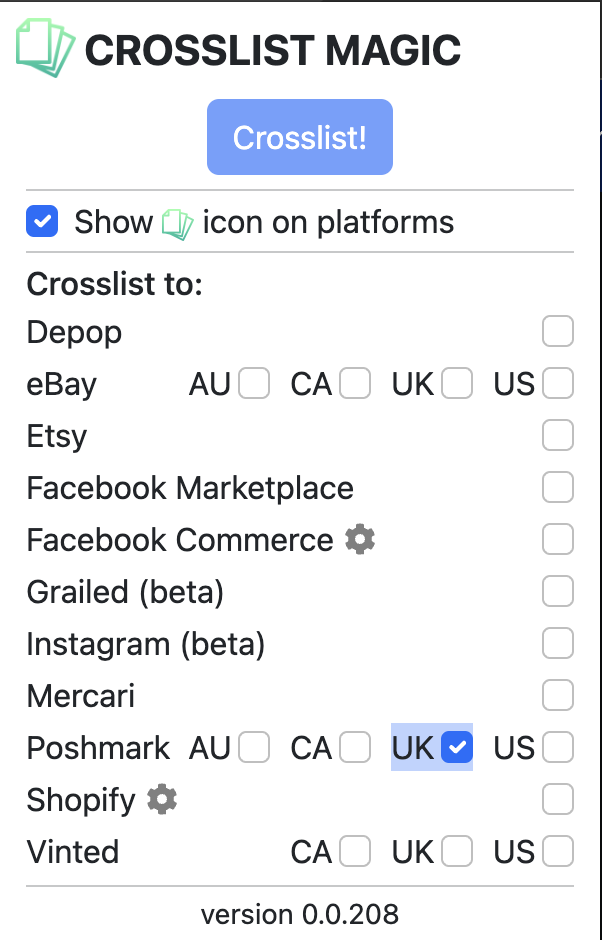
- Now go to the Etsy listing that you want to crosslist. For best results, go to the individual listing's URL.
- When you are on the individual listing's URL, you can choose between two different ways of crosslisting:
- Notice the
 in the top left corner of the listing's image. Click on it.
 - Bring up the extension's popup again and click on the "Crosslist!" button (see picture above).
- Notice the